
OBS Studio (Open Broadcaster Software) has been my go-to tool for video streaming and recording for years. It’s an absolutely awesome open-source project that powers everything from live gaming streams to professional broadcasts. The flexibility, plugin ecosystem, and cross-platform support make it indispensable for anyone working with real-time media.
It’s been quite a while since I last built OBS from source and really dove into its internals. With the recent addition of WebRTC WHIP/WHEP protocols, I wanted to revisit the project and test out this exciting new capability. Having attended IETF meetings where these draft specifications were being developed, I was particularly excited to see them implemented in production software.
- About WHIP and WHEP
- So Why These Protocols Matter ?
- Download mediamtx and Run the server (no configuration needed!)
About WHIP and WHEP
WHIP (WebRTC-HTTP Ingestion Protocol) and WHEP (WebRTC-HTTP Egress Protocol) are IETF draft standards
- WHIP (RFC 9725): https://datatracker.ietf.org/doc/rfc9725/ – Published Standard for WebRTC stream ingestion via HTTP
- WHEP (Internet-Draft): https://datatracker.ietf.org/doc/draft-ietf-wish-whep/ – Tries to standardize WebRTC stream distribution via HTTP.
So Why These Protocols Matter ?
From the IETF specifications, these protocols were designed to address fundamental challenges in WebRTC deployment:
WHIP (RFC 9725)’s objective is to Provide a simple HTTP-based protocol for WebRTC stream ingestion that eliminate the need for custom signaling protocols and WebSocket connections. This enable interoperability between encoders and media servers from different vendors and also support authentication and authorization through standard HTTP mechanisms (Bearer tokens). Similarly, it provides a standardized way to terminate sessions via HTTP DELETE
WHEP (Draft) Objective is to mirror WHIP’s simplicity for the playback/egress side. So it aims to enable one-to-many broadcasting scenarios with WebRTC while supporting adaptive bitrate through simulcast and scalable video coding. Note that unlike WHIP, WHEP ( at the time of writing this article) is only a draft document submitted, which describes simple HTTP-based protocol for WebRTC based viewers to watch content from streaming services and/or Content Delivery Networks (CDNs) or WebRTC Transmission Network (WTNs).
1. Build OBS Studio from Source
Instead of using pre-built OBS binaries its kinda great to compile it from scratch. The build process is surprisingly smooth thanks to CMake, though the initial setup requires downloading dependencies.
Note: I’m using Visual Studio 2026 (18.4.0) on Windows, but OBS builds on Linux and macOS as well.
# Configure CMake (downloads dependencies automatically)cmake -S . -B build_x64# Build the project (parallel build speeds things up significantly)cmake --build build_x64 --config Release --parallel
Result: OBS executable at build_x64/rundir/Release/bin/64bit/obs64.exe
build_x64/
├── frontend/
│   └── Release/
│       └── obs64.exe          ← Build output
└── rundir/
    └── Release/
        └── bin/
            └── 64bit/
                └── obs64.exe  ← Final runtime location
The build includes the obs-webrtc plugin by default, which is what we’ll be testing. This plugin leverages libdatachannel for WebRTC implementation and supports the WHIP protocol natively.
2. Run OBS Studio
Start-Process "build_x64\rundir\Release\bin\64bit\obs64.exe" -WorkingDirectory "build_x64\rundir\Release\bin\64bit"
Verify: Check $env:APPDATA\obs-studio\logs for runtime logs
=== Latest Log: 2026-03-17 09-29-36.txt ===
15:23:03.742:   id: \\?\DISPLAY#AUS270B#5&6875e40&1&UID4353#{e6f07b5f-ee97-4a90-b076-33f57bf4eaa7}
15:23:03.742:   alt_id: \\.\DISPLAY1
15:23:03.742:   setting_id: \\?\DISPLAY#AUS270B#5&6875e40&1&UID4353#{e6f07b5f-ee97-4a90-b076-33f57bf4eaa7}
15:23:03.742:   force SDR: false
15:23:06.642: [duplicator-monitor-capture: 'Display Capture'] update settings:
15:23:06.642:   display:  (0x0)
15:23:06.642:   cursor: true
15:23:06.642:   method: WGC
15:23:06.642:   id:
15:23:06.642:   alt_id:
15:23:06.642:   setting_id: DUMMY
15:23:06.642:   force SDR: false
15:23:17.226: User added source 'Video Capture Device' (dshow_input) to scene 'Scene'
15:23:17.235: Video Capture Device: DecodeDeviceId failed
15:23:17.235: Video Capture Device: Video configuration failed
15:23:17.480: ---------------------------------
15:23:17.480: [DShow Device: 'Video Capture Device'] settings updated:
15:23:17.480:   video device: HD Webcam eMeet C960
15:23:17.480:   video path: \\?\usb#vid_328f&pid_003f&mi_00#9&124b7a38&0&0000#{65e8773d-8f56-11d0-a3b9-00a0c9223196}\global
15:23:17.480:   resolution: 640x480
15:23:17.480:   flip: 0
15:23:17.480:   fps: 30.00 (interval: 333333)
15:23:17.480:   format: YUY2
15:23:17.480:   buffering: disabled
15:23:17.480:   hardware decode: disabled
15:24:04.545: Loading branches from file failed: Opening file failed.
15:37:57.050: Max audio buffering reached!
15:37:57.050: adding 917 milliseconds of audio buffering, total audio buffering is now 960 milliseconds (source: Desktop Audio)
15:37:57.050:
15:37:57.071: Source Desktop Audio audio is lagging (over by 834667.38 ms) at max audio buffering. Restarting source audio.
3. Setup WHIP Server (mediamtx)
OBS Studio’s obs-webrtc plugin implements WHIP, which requires a server to:
- Receive WebRTC streams from OBS via HTTP POST with SDP offer/answer negotiation
- Handle ICE/STUN/TURN for NAT traversal and peer connection setup (including trickle ICE support)
- Redistribute streams to viewers via WHEP (WebRTC-HTTP Egress Protocol) (TODO)
- Manage session lifecycle – HTTP DELETE terminates sessions
- Support authentication via HTTP Bearer tokens
- Enable load balancing through HTTP 307 redirects
Unlike traditional RTMP servers, WHIP servers should enable <1s using WebRTC’s RTP transport. Having been part of the IETF discussions that shaped these protocols, it’s fascinating to see the design decisions translate into real-world performance benefits. So I expect to just HTTP POST my SDP offer to the WHIP endpoint, get back a 201 Created with SDP answer and resource Location, and be streaming. No complex WebSocket signaling, no custom protocols.
Download mediamtx and Run the server (no configuration needed!)
Invoke-WebRequest -Uri "https://github.com/bluenviron/mediamtx/releases/download/v1.8.4/mediamtx_v1.8.4_windows_amd64.zip" -OutFile "mediamtx.zip"Expand-Archive -Path "mediamtx.zip" -DestinationPath "mediamtx"cd mediamtx.\mediamtx.exe
Default Ports:
- WHIP endpoint:
http://localhost:8889/{stream}/whip - WHEP endpoint:
http://localhost:8889/{stream}/whep - RTSP:
rtsp://localhost:8554/{stream} - HLS:
http://localhost:8888/{stream}
Configuration: mediamtx works out-of-the-box. For advanced settings, edit mediamtx.yml
Logs snippet
2026/03/17 09:23:05 INF MediaMTX v1.8.4
2026/03/17 09:23:05 INF configuration loaded from C:\Users\altan\Downloads\OBS\obs-studio\mediamtx\mediamtx.yml
2026/03/17 09:23:05 INF [RTSP] listener opened on :8554 (TCP), :8000 (UDP/RTP), :8001 (UDP/RTCP)
2026/03/17 09:23:05 INF [RTMP] listener opened on :1935
2026/03/17 09:23:05 INF [HLS] listener opened on :8888
2026/03/17 09:23:05 INF [WebRTC] listener opened on :8889 (HTTP), :8189 (ICE/UDP)
2026/03/17 09:23:05 INF [SRT] listener opened on :8890 (UDP)
2026/03/17 09:23:40 INF [WebRTC] [session 4c95bc04] created by [::1]:64696
2026/03/17 09:23:40 INF [WebRTC] [session 4c95bc04] closed: no one is publishing to path 'mystream'
2026/03/17 09:29:56 INF [WebRTC] [session b15a4fef] created by [::1]:53070
2026/03/17 09:29:56 INF [WebRTC] [session b15a4fef] closed: no one is publishing to path 'mystream'
2026/03/17 09:29:57 INF [WebRTC] [session 4f42ee65] created by [::1]:53070
2026/03/17 09:29:57 INF [WebRTC] [session 4f42ee65] closed: no one is publishing to path 'mystream'
2026/03/17 16:15:33 INF [WebRTC] [session b1cfc835] created by [::1]:57732
2026/03/17 16:15:34 INF [WebRTC] [session b1cfc835] peer connection established, local candidate: host/udp/192.168.68.90/8189, remote candidate: prflx/udp/169.254.197.35/55983
2026/03/17 16:15:35 INF [WebRTC] [session b1cfc835] is publishing to path 'mystream', 2 tracks (Opus, H264)
2026/03/17 16:16:48 INF [WebRTC] [session 079d3b5c] created by [::1]:58062
2026/03/17 16:16:48 INF [WebRTC] [session 079d3b5c] peer connection established, local candidate: host/udp/169.254.197.35/8189, remote candidate: prflx/udp/169.254.197.35/64607
2026/03/17 16:16:48 INF [WebRTC] [session 079d3b5c] is reading from path 'mystream', 2 tracks (Opus, H264)
4. Create HTML Test Player
Create test-webrtc-playback.html with WebRTC player
5. Configure OBS for WHIP Streaming
Now comes the exciting part—configuring OBS to use WHIP instead of traditional RTMP.
- Open OBS Studio
- Add a source (Display Capture, Window Capture, your cat whatever..)
- Settings → Stream
- Service:
WHIP - Server:
http://localhost:8889/mystream/whip - Bearer Token: (leave empty for local testing)
- Service:
- Click Apply → OK
- Click Start Streaming
Behind the scenes, OBS performs an HTTP POST to the WHIP endpoint with an SDP offer containing:
- Codec information (H.264/HEVC/AV1 for video, Opus for audio)
- ICE candidates for network traversal
- Media stream IDs and track information
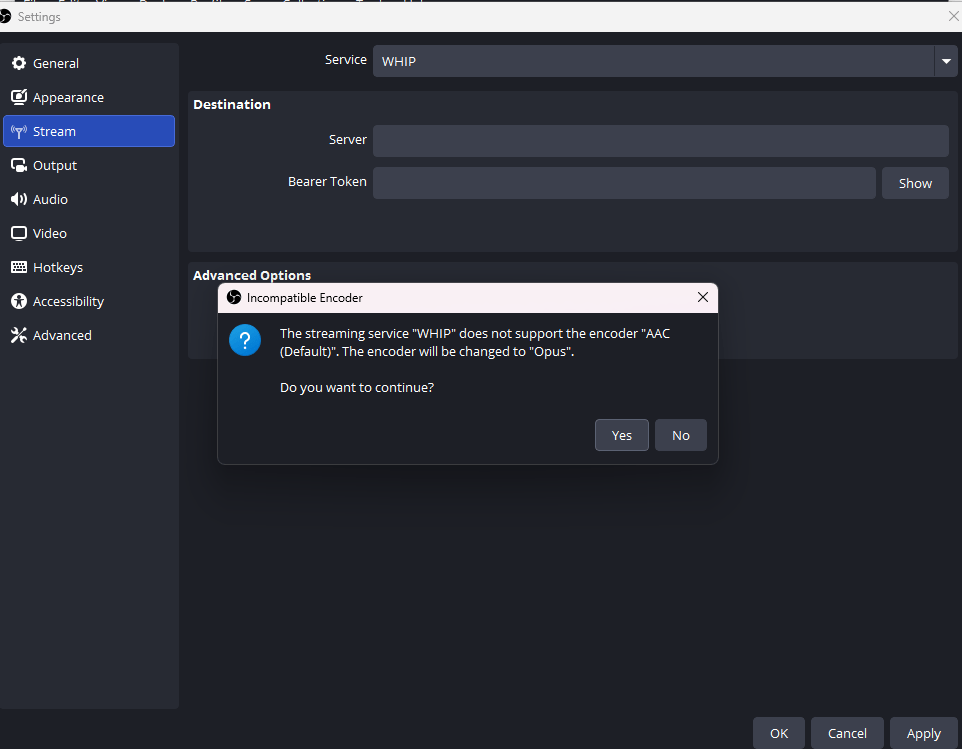
The server responds with an SDP answer, and the WebRTC peer connection is established. Simple.
6. Test Playback with WHEP
The viewer side uses WHEP (WebRTC-HTTP Egress Protocol), the companion spec to WHIP. Just as WHIP simplifies publishing, WHEP makes playback straightforward.
- In the browser (test-webrtc-playback.html)
- WHEP URL:
http://localhost:8889/mystream/whep - Click Connect
- Stream should appear with <1 second latency
The HTML player performs an HTTP POST to the WHEP endpoint with its SDP offer, receives the server’s answer, and establishes a WebRTC peer connection. No proprietary protocols,—just standardized WebRTC in the browser.
What you’ll experience:
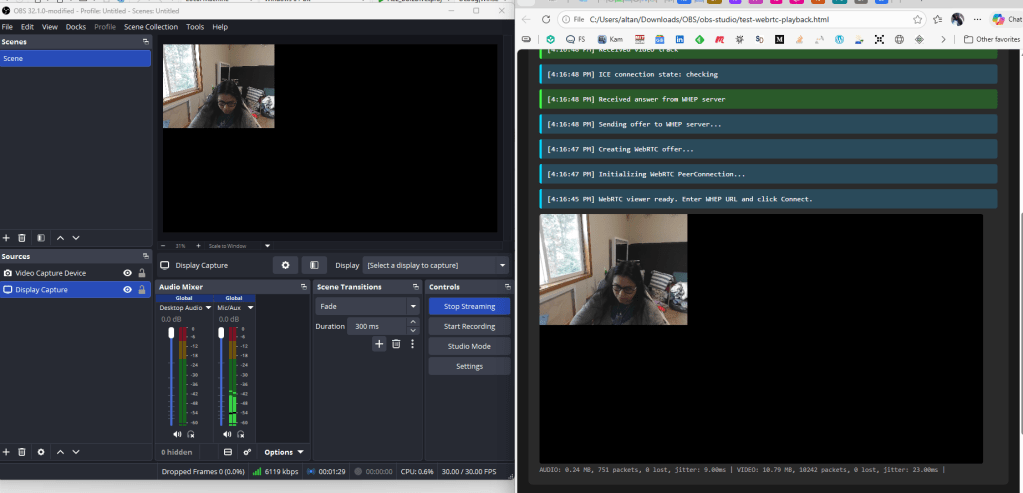
Near-instantaneous stream start + Smooth playback at your source framerate
Smooth and crisp SDP exchange
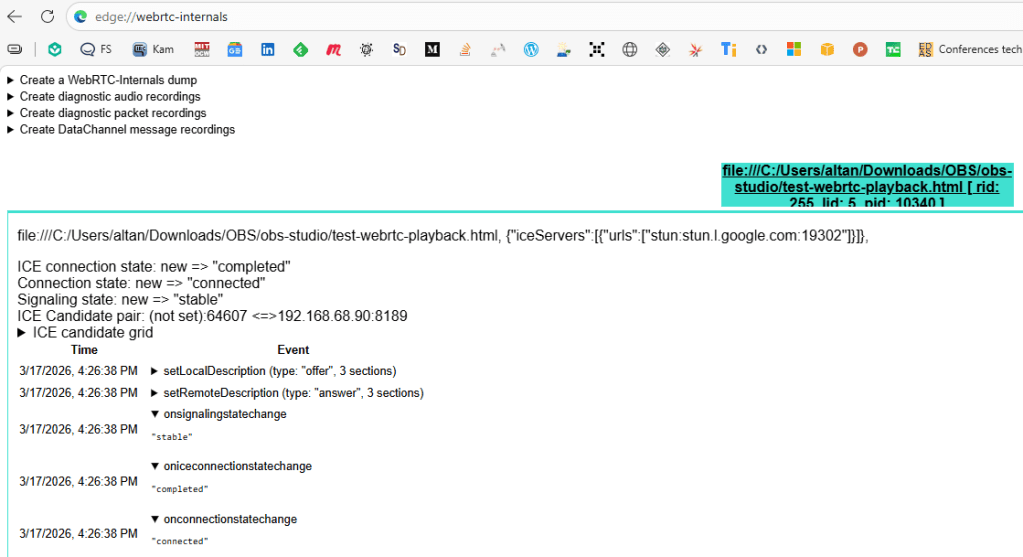
Also Real-time stats showing bytes received, packet loss, jitter + True interactive latency for two-way communication use cases
AUDIO: 2.10 MB, 6651 packets, 0 lost, jitter: 10.00ms | VIDEO: 95.30 MB, 90393 packets, 0 lost, jitter: 23.00m
Or goto chrome://webrtc-internals for the detailed view
Statistics IT01V4267985642
timestamp	3/17/2026, 4:28:01 PM
bytesReceived	505663558
codecId	CIT01_109_level-asymmetry-allowed=1;packetization-mode=1;profile-level-id=42e01f	🔗
decoderImplementation	ExternalDecoder (D3D11VideoDecoder)
estimatedPlayoutTimestamp	3982778881401
firCount	0
frameHeight	720
frameWidth	1280
framesAssembledFromMultiplePackets	20141
framesDecoded	20142
framesDropped	0
framesPerSecond	30
framesReceived	20146
freezeCount	0
headerBytesReceived	5478960
jitter	0.023
jitterBufferDelay	1935.284545
jitterBufferEmittedCount	20142
jitterBufferMinimumDelay	1447.6261889999998
jitterBufferTargetDelay	1924.9337189999999
keyFramesDecoded	81
kind	video
lastPacketReceivedTimestamp	1773790082077.461
mid	0
minPlayoutDelay	0.113
nackCount	0
packetsLost	0
packetsReceived	456580
packetsReceivedWithCe	0
packetsReceivedWithEct1	0
pauseCount	0
pliCount	10
powerEfficientDecoder	true
remoteId	ROV4267985642	🔗
ssrc	4267985642
totalAssemblyTime	4.002161
totalDecodeTime	7.443236
totalFreezesDuration	0
totalInterFrameDelay	671.397
totalPausesDuration	0
totalProcessingDelay	1943.1741359999999
totalSquaredInterFrameDelay	23.392953000002198
trackIdentifier	cd91177d-1b57-458a-9598-945f1b11ab23
transportId	T01	🔗
type	inbound-rtp
[framesReceived-framesDecoded-framesDropped]	4
[codec]	H264 (109, level-asymmetry-allowed=1;packetization-mode=1;profile-level-id=42e01f)
[lastPacketReceivedTimestamp]	3/17/2026, 4:28:02 PM
[estimatedPlayoutTimestamp]	3/17/2026, 4:28:01 PM
[bytesReceived_in_bits/s]	5796213
[headerBytesReceived_in_bits/s]	63158
[framesReceived/s]	28.995384523752566
[framesDecoded/s]	29.995225369399208
[keyFramesDecoded/s]	0
[totalDecodeTime/framesDecoded_in_ms]	0.30120000000000147
[totalInterFrameDelay/framesDecoded_in_ms]	33.10000000000173
[interFrameDelayStDev_in_ms]	5.855766388792323
[jitterBufferDelay/jitterBufferEmittedCount_in_ms]	109.5702666666663
[jitterBufferTargetDelay/jitterBufferEmittedCount_in_ms]	102.99999999999727
[jitterBufferMinimumDelay/jitterBufferEmittedCount_in_ms]	75.22246666666585
[totalProcessingDelay/jitterBufferEmittedCount_in_ms]	109.89603333333282
[totalAssemblyTime/framesAssembledFromMultiplePackets_in_ms]
This is a massive improvement over traditional HLS (5-30s latency) or even Low-Latency HLS (2-4s). Btw seeing it work end-to-end is incredibly satisfying.
If you are still reading then here is the Architecture

Endpoints
- OBS WebSocket:
ws://localhost:4455(for API control) - WHIP Ingest:
http://localhost:8889/mystream/whip(publish) - WHEP Playback:
http://localhost:8889/mystream/whep(view)
Ports
 Get-NetTCPConnection -LocalPort 8889,4455

LocalAddress                        LocalPort RemoteAddress                       RemotePort State       AppliedSetting
------------                        --------- -------------                       ---------- -----       --------------
::1                                 8889      ::1                                 58062      Established Internet
::                                  8889      ::                                  0          Listen
::                                  4455      ::                                  0          Listen
I also made a stats heavy page for latency testing ( also found in the rep oquiche-webtransport-playground/test-webrtc-playback.html at main · altanai/quiche-webtransport-playground )
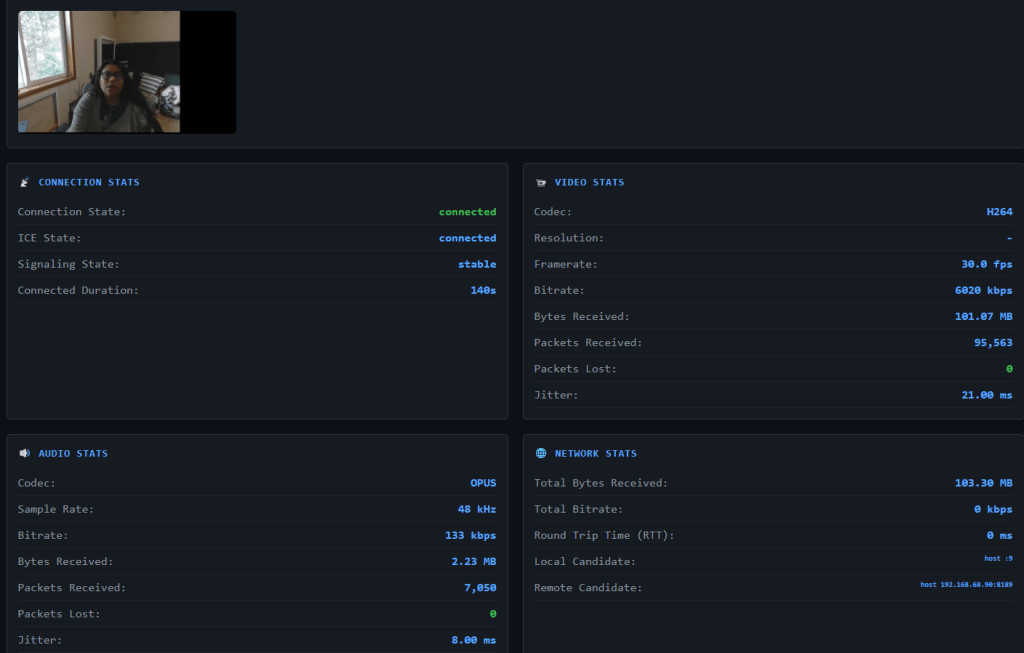
So if you are testing things in the wild remember these key Metrics to Watch:
| Metric | Good | Warning | Bad |
|---|---|---|---|
| Packet Loss | 0% | <1% | >1% |
| Jitter | <10ms | 10-30ms | >30ms |
| RTT | <50ms | 50-150ms | >150ms |
| Bitrate | Stable | Fluctuating | Dropping |
Resources & Further Reading
- OBS Studio: https://obsproject.com – Amazing open-source streaming software
- WHIP Spec (IETF): https://datatracker.ietf.org/doc/draft-ietf-wish-whip/ – WebRTC-HTTP Ingestion Protocol
- WHEP Spec (IETF): https://datatracker.ietf.org/doc/draft-murillo-whep/ – WebRTC-HTTP Egress Protocol
- mediamtx: https://github.com/bluenviron/mediamtx – Excellent multi-protocol media server
- libdatachannel: https://github.com/paullouisageneau/libdatachannel – WebRTC library used by OBS
 Telecom R & D